 PODspy

A tea towel design has more than one useful view. Someone may see the complete illustration in a listing, a narrow panel when it is folded over a rail, or a corner when it hangs from a loop. This guide develops a citrus-and-herb direction, uses a simple fold study to check the composition, and explains a supplier-specific case where a portrait towel needs a landscape upload file.
The creative shortcut
- Choose the towel and print method before deciding how far the artwork can extend.
- Check the flat composition and one realistic folded view; a centered design can still disappear from view.
- Match the supplier’s upload orientation and template, then inspect an actual sample before making product claims.
Choose the towel and print area first
Decide whether you are making a placed illustration, a design that covers the whole towel, or a repeating pattern. A placed illustration gives one composition a clear position. An all-over design needs a deliberate arrangement across the full supplied artboard. A repeat needs its joins checked as well as its overall scale.
Choose the exact product and print method before finishing the layout. Record the material, finished dimensions, printable area, file dimensions, orientation, hem or safety guides, and any hanging loop. A finished towel size is not necessarily the size of its upload file.
Keep supplier variants separate. Prodigi, for example, lists different US and UK towel versions and materials. Do not reuse another supplier’s bleed, resolution or background rules simply because both products are called tea towels.
For this exercise, the art direction is a quiet ivory background with a recognizable cluster of yellow lemons and teal herbs. It can become a placed design; it is not being presented as a seamless repeat or an approved production file.
Check what the fold leaves visible
Make a small portrait sketch before polishing the artwork. Mark where the main citrus cluster will sit and how much space it needs around it. Give secondary sprigs a supporting role rather than scattering equally important details across every edge.
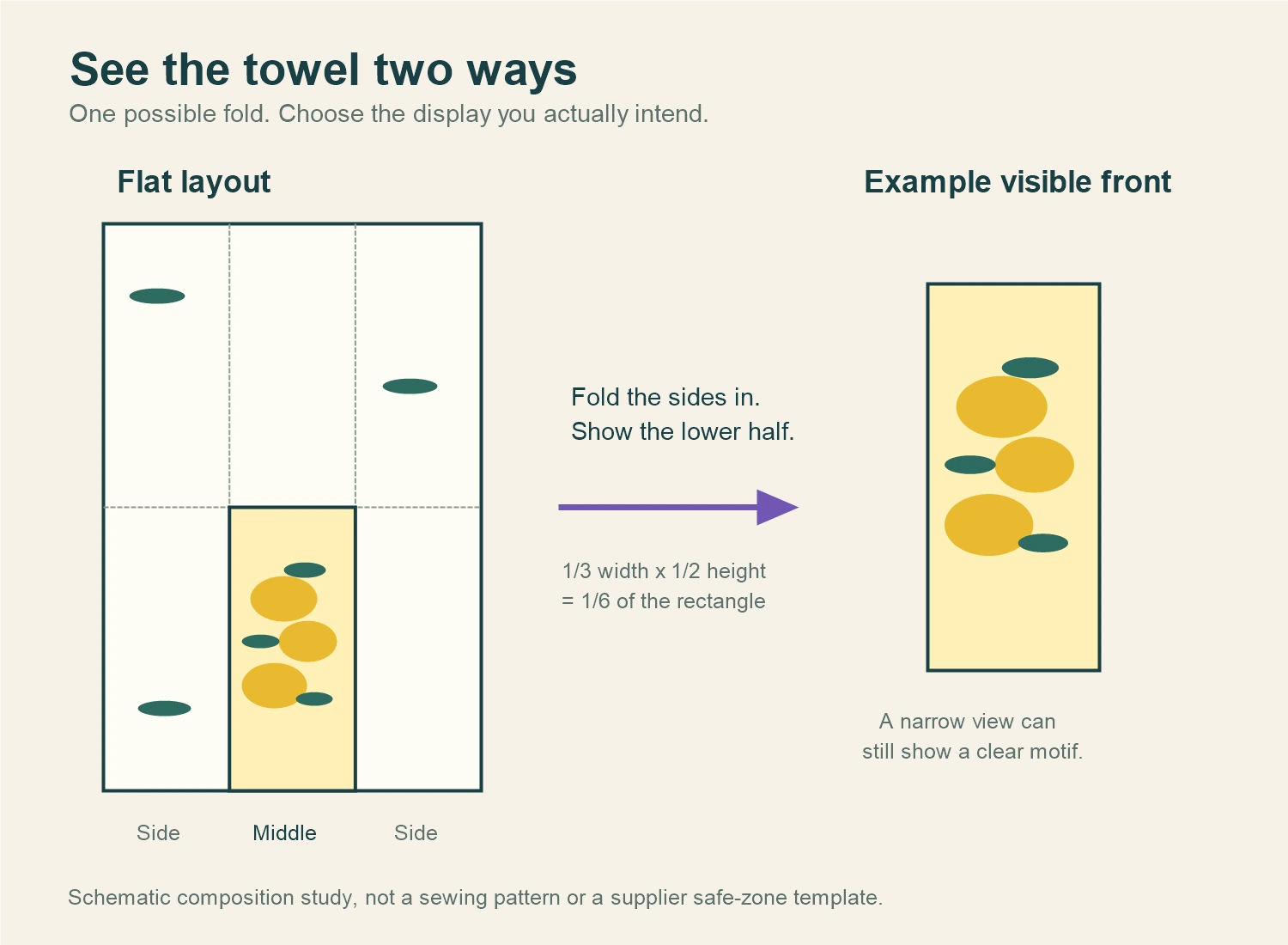
Now test one possible display: fold the outer vertical thirds inward, then imagine the strip draped halfway over a rail with the lower half facing you. In this simplified study, the visible front is only one sixth of the original rectangle. A motif that works across the full width may no longer be recognizable there.
Place the main lemon group within the lower part of the central third for this particular display, leaving room around its silhouette. Review the whole towel again so that the flat view still feels balanced. If you prefer a full-width scene, decide which smaller fragment should remain interesting when folded.
Use the diagram as a composition exercise, not a sewing pattern or a safe-zone template. Real folds, hems, loops and display habits differ. Try your intended fold with a paper printout, then repeat the check with the physical sample.
Develop the citrus artwork in PODspy
Use the brief below to explore a single citrus-and-herb motif. Open it in Generate Image, choose an aspect ratio that suits the artwork you want to arrange, and edit the wording before selecting Generate. The link fills the exact brief; opening it does not start generation.
In the editorial illustration, the lemons form a clear central group. The slender rosemary stems and small white blossoms are details to inspect after scaling. In your own result, also check that cut surfaces make sense, stems join leaves coherently, and no marks resemble unwanted lettering. Choose a version worth developing before arranging it in the towel layout.
The editorial illustration shows the art direction, not a towel made in PODspy or a result from a fabric printer. Place your selected artwork in an editor with the supplier’s template. Keep the motif on its own layer so that you can change its scale or position without rotating individual leaves.
Create flat botanical artwork of three golden-yellow lemons, one simple lemon half, dark teal-green leaves, rosemary sprigs and a few small white herb blossoms. Arrange them as one clear central cluster on a warm ivory background, with restrained smaller sprigs around it. Use broad recognizable silhouettes, deliberate open spaces, and a hand-painted gouache and cut-paper style with subtle pencil texture. Keep the palette to ochre, deep teal, soft sage and warm ivory. Make this an illustration motif that I can arrange in a tea towel layout. No words, recipe text, lettering, logos, watermark, fabric texture, hems, hanging loops, fold marks, border, mockup or product photograph.
Separate the upright design from the upload orientation
Check the supplier’s instructions even when your towel is clearly a portrait design. Spoonflower’s May 2026 guide describes a finished 16 × 24-inch portrait towel but asks for a 27 × 18-inch upload at 150 pixels per inch: 4050 × 2700 pixels. The top of the artwork points toward the left side of that landscape file.
For that setup, an upright working layout can be 2700 pixels wide by 4050 pixels tall. Rotating the complete layout 90 degrees counterclockwise produces the 4050 × 2700 landscape file and moves its top to the left. Rotate the composition as a whole; do not turn each motif separately.
Spoonflower also documents a Rotate Design step that displays the upload 90 degrees clockwise and specifies Basic repeat. These are that provider’s published instructions, not a universal towel workflow or a supplier interface tested for this article.
Use the current downloadable template to position important details inside the actual construction guides. If a help page and template disagree, ask the supplier to confirm the setup before ordering. Save clearly named upright-working and supplier-upload versions so you can review both without guessing.
Check detail at the size it will print
Judge the placed artwork at its intended physical size. Inspect leaf tips, the lemon-half interior and gaps between stems. Tiny marks that look attractive on a large monitor can merge when the motif is reduced. Keep a copy before simplifying them.
Calculate resolution from usable pixels and placed size. A motif that is 1536 pixels wide and placed 6 inches wide provides 256 pixels per inch. If the selected product requires 300 pixels per inch at that width, you need 1800 usable pixels across. Enlarging an export or changing its DPI label does not by itself add convincing detail.
Follow the exact product’s format and color instructions. Spoonflower’s example uses 150 pixels per inch, while Prodigi lists an optimal 300 dpi for its towels. Those are different supplier specifications, not competing rules for every textile.
Check how your chosen product handles unprinted areas. Prodigi specifically says transparent areas show the material’s natural color and that white ink cannot be printed on this product. Do not assume a white area in an illustration will become opaque white ink on fabric.
Export one deliberate delivery file
Extend backgrounds as the template instructs and keep essential artwork inside its safe area. A narrow decorative border close to the hem makes small shifts more noticeable; leave yourself room or choose a borderless arrangement.
Keep fold-study lines, alignment marks and working notes on separate layers. Remove the guides the supplier tells you to remove before exporting. Preserve an editable master with the original motif, layout and template reference.
Reopen the exact delivery file. Confirm its pixel dimensions, orientation, background treatment and file format. Check that you exported the intended version, with no fold grid or accidentally hidden artwork. Then inspect the supplier preview for both the complete design and the edges.
File requirements can change with printing method as well as product. Mary’s Kitchen’s current guide separates screen-print, DTG and edge-to-edge preparation. Use that distinction to ask the right questions, rather than carrying one printer’s settings into another order.
Review a real sample in the intended display
Order and inspect a sample before claiming how the artwork prints or performs. Look at the full design, the hemmed edges and the view you planned over a rail or from a loop. Check whether the lemons remain recognizable and whether the herbs still have useful separation.
Follow the product’s care instructions if you evaluate washing, then record what you actually observe. The generated illustration and paper fold study cannot establish printed color, absorbency, durability or wash performance.
Use photographs of the approved physical product in the listing and make sure the flat and folded views show the same artwork. Describe the actual material, size and print arrangement for that version. Keep any decorative mockup clearly separate from evidence of the manufactured item.
Save the approved filenames, supplier version and sample notes with the design. That gives you a practical starting point for another illustration in the same kitchen collection.


